
New player guide
Everything you need for your first days on WhaleSMP OneBlock, in the order you'll meet it.
Getting on
WhaleSMP works on both Java and Bedrock. The server address is play.whalesmp.com.
- Java: version 1.21.4 or newer, 26.2 recommended. Accept the resource pack when it asks: it downloads by itself and brings the server's custom items and art.
- Bedrock: add a server with the address above and port 19132.
The Join page walks you through every step, with copy buttons.
From the Hub to OneBlock
You land in the Hub first. Walk up to the OneBlock NPC, or use the server selector, to head to OneBlock.
Once you're there, talk to Whaley, the OneBlock Manager at spawn, or type /is home, and your island is made for you. Lost? /spawn takes you back to spawn. Stuck? Ask in our Discord.
Spawn is big. Talk to the Navigator to open the World Traveler map and click any spot to go there. /settings lets you turn things like invites, trade requests and the quest arrow on or off.
Your island
Everyone gets their own OneBlock island. Type /is home to go to yours. The first time, it's made for you: just the OneBlock on a single bedrock block. Fall into the void and you land back on your island.
/is opens the island menu, with your team, settings and more in one place. /is info shows who's on your island and how it's set up.
Playing with friends
An island holds up to 4 players, the owner included. Each extra member makes every phase a little longer.
- Invite an online player with
/is invite <player>. The invite lasts two minutes. - They type
/is acceptto join, or/is denyto say no. - Already have an island of your own? You'll need to delete it before you can join someone else's.
Roles
- OwnerMade the island. The only one who can promote, demote or delete:
/is promote <player>makes a member a co-owner and/is demote <player>turns them back. - Co-ownerCan invite players and kick members.
- MemberPlays on the island with you.
- VisitorEveryone else.
Leave a team with /is leave. Owners and co-owners take someone off with /is kick <player>, but only someone below their own role. An owner can't leave their own island: /is delete confirm deletes it for good instead.
Visitors and permissions
/is lock makes your island members only, and /is unlock lets visitors back in. To see a friend's island, /is visit <player> takes you there if it's open.
In the island menu, Settings then Permissions lets you choose what co-owners, members and visitors may do: build, open chests, use doors and redstone, pick up and drop items, look after animals, trade with villagers and more. Owners and co-owners can also make it always day or always clear, and stop mobs spawning by themselves.
Want visitors? /is setwarp sets your island's public warp, and Public Warp in the island settings opens it. Everyone can find it in /is warps.
Builds and mail
Bob the Builder sells Blueprints: ready-made builds you pay for in materials, then place on your island to build themselves over time. Open his shop with /blueprints.
Rewards that don't fit in your inventory wait in your Parcels, and your island's news waits in News. /mail opens the Post Office with both.
/sethome doesn't work on islands. Use /is home to get back to yours.
The OneBlock
Your island starts as a single block. Break it and it comes back as something new: a block, sometimes with a mob, and now and then a loot chest. Every break counts towards your phase.
The phase bar
The bar at the top of your screen shows your phase and how many of its breaks you've done. The line above your hotbar shows the phase's block, its name and how far through it you are. /is phase shows your phase, your progress, the phase after it and your island's total breaks.
When a phase is done, the next one starts with a title on screen, and the block right after is a reward chest filled with that phase's reward.
The 50 phases
Each phase has its own blocks, mobs and loot, and lasts a set number of breaks. Plains is short to get you going and later phases run longer. After End City come twenty Realms, from the Candy Kingdom to the Throne of the Ancients, each with its own custom blocks, mobs and material. After the last one, the cycle starts again at Plains.
The Nether, the End and the first Realm each wait for an island level (see Island upgrades, levels and worth). Until your island has it, you keep breaking the phase before, and every break still counts.
 Plains
500 breaks Underground
1,000 breaks Meadow
1,200 breaks Forest
1,400 breaks Snow
1,600 breaks Taiga
1,800 breaks Beach
2,000 breaks Ocean
2,200 breaks Swamp
2,400 breaks Jungle
2,600 breaks Desert
2,800 breaks Savanna
3,000 breaks Badlands
3,200 breaks Mushroom Fields
2,500 breaks Dark Forest
3,400 breaks Lush Caves
3,500 breaks Cherry Grove
3,600 breaks Dripstone Caves
3,800 breaks Mangrove Swamp
4,000 breaks Coral Reef
4,200 breaks Frozen Peaks
4,400 breaks Pale Garden
4,600 breaks Deep Dark
5,000 breaks Nether
5,000 breaks Crimson Forest
5,200 breaks Warped Forest
5,400 breaks Soul Sand Valley
5,600 breaks Basalt Deltas
5,800 breaks The End
6,000 breaks End City
7,000 breaks Candy Kingdom
6,000 breaks Fairy Glade
6,200 breaks Crystal Caverns
6,400 breaks Sunken Atlantis
6,650 breaks Pirate Cove
6,850 breaks Haunted Graveyard
7,050 breaks Pharaoh's Tomb
7,250 breaks Clockwork Workshop
7,450 breaks Toxic Wasteland
7,700 breaks Frozen Kingdom
7,900 breaks Volcanic Forge
8,100 breaks Sky Islands
8,300 breaks Whale's Reef
8,550 breaks Mushroom Kingdom
8,750 breaks Dragon's Lair
8,950 breaks Shadow Realm
9,150 breaks Celestial Heavens
9,350 breaks Cosmic Nebula
9,600 breaks Void Abyss
9,800 breaks Throne of the Ancients
10,000 breaks
Chests and mobs
Loot chests hold that phase's chest loot, so open every one. Mobs come with some blocks, and each phase has its own: farm animals on the Plains, monsters Underground, blazes and endermen much later. Wolves, cats, parrots, horses and donkeys only ever come from the block, wild and ready to tame.
Breaking the block can also give you raw materials (see Materials and the Realm Forge) and crate keys (see Keys and crates).
Going back to a phase
Need more of an earlier phase's blocks or materials? /phase lets owners and co-owners switch the OneBlock to any phase your island has finished. Your own phase's progress is kept for when you switch back.
Quests and your level
Each phase has quests to do, paying Shards, Pearls and more. /quests opens them, and the one you track shows on screen with an arrow pointing the way. Playing earns you player levels too (/level), and each phase's quests open as your level goes up.
Resource worlds
Need wood, stone or ore beyond your island? Talk to Rufus at spawn to visit the shared resource worlds: the Overworld, the Nether and the End. The Nether and End ones open at higher island levels, and every world resets each week.
Keys and crates
Every time you break the OneBlock, you have a chance to find a crate key. Each key starts dropping from its own phase, and stays in every phase after it. The key lands in your inventory (or your Parcels if it's full), with a line in chat to tell you.
- Rare Key1 in 1,000 breaks, every phase
- Epic Key1 in 4,000 breaks, from Ocean
- Spawner Key1 in 8,000 breaks, from Dark Forest
- Legendary Key1 in 25,000 breaks, from the Nether
You earn Vote Keys by voting, so vote every day on the Vote page. Keys are items: they stack, and you can trade them.
Opening crates
Bring your keys to the crates at spawn. Right-click a crate with its key in your inventory to open it, sneak and right-click to open several at once, or left-click to see what's inside. /crates shows every crate's rewards and how many keys you carry, from anywhere.
Crates give money notes, diamond and netherite gear, enchanted books, spawners and more. Every reward and its chance is in the wiki.
The Christmas Crate and the Lucky Box need no key: they're items from the store. Hold one and right-click to open it right where you stand.
The Piñata Party
Every OneBlock break on the server fills a community count, shown on a boss bar. When it reaches 50,000, a giant Piñata comes to spawn for everyone to hit. Type /pinata join to get there from anywhere. Land 10 hits for money, Piñata loot, a Vote Key, Shards and a shot at a grand prize, and the three players with the most hits win crate keys and more on top. /pinata shows the count and /pinata top the best hitters.
Christmas Gifts
Christmas Gifts come from the Christmas Crate and the Christmas tools. Right-click one to open it for a prize: a money note, Gingerbread Cookies, materials, a Rare Key or even a whole Christmas Crate.
Materials and the Realm Forge
Gear on WhaleSMP is made from materials, and materials come in steps: raw, then refined, then combined.
Raw materials
As you break the OneBlock, some phases drop a raw material straight into your inventory. Each group of phases has its own:
 Wild Fiber
Plains, Meadow and Savanna Heartwood
Forest, Taiga, Dark Forest, Cherry Grove, Mangrove Swamp and Pale Garden Ore Fragment
Plains, Underground, Meadow, Forest, Taiga, Badlands, Dripstone Caves and Deep Dark Frost Flake
Snow and Frozen Peaks Brine Reef
Beach, Ocean and Coral Reef Bog Moss
Swamp, Lush Caves and Mangrove Swamp Sun Shard
Desert, Savanna and Badlands Spore
Mushroom Fields, Lush Caves, Crimson Forest and Warped Forest Nether Cinder
Nether, Crimson Forest, Warped Forest, Soul Sand Valley and Basalt Deltas Void Dust
The End and End City
Growing your own
Raw materials can be farmed. Bog Moss, Spore and Brine Reef are their own seeds, and Wild Fiber grows from Wild Fiber Seeds, which drop in the same phases as Wild Fiber and can be crafted from the fiber. Plant a seed on the right soil on your island (Bog Moss only grows on mud near water) and it grows into a plant you can harvest again and again. A Growth Totem and your island's level speed them up, but bone meal doesn't work on them. Each material's wiki page says how to farm it.
Refining and combining
- Refine: put a big pile of a single raw material into the Realm Forge and it turns into its refined form, like Wild Fiber into Refined Wild Fiber.
- Combine: mix different refined materials to make a combined material: Ancient Bark, Glacial Core, Tide Pearl, Echo Crystal, Molten Ember and Ender Essence.
Refining and combining are open from the start. Each Realm after End City brings its own raw and refined material.
The Realm Forge
Craft a lodestone named Realm Forge: your recipe book shows how. Place it on an island where you're allowed to use things and right-click it to open the forge. Sneak while clicking to use the block normally instead.
- Pick a recipe: every recipe is listed on the left, under tabs for materials, gear and upgrades, with a search bar. Click a recipe to see its 5×5 grid and what it needs, in green when you have enough. Click it again to make more at once.
- Forge: press Forge and the materials come straight out of your inventory. Short of something? Nothing is taken, and the forge says what's missing.
- Gear recipes open once your island reaches the phase the gear unlocks in. Until then they show a padlock and the phase that opens them.
- Upgrades take your gear and its materials and give it back a tier higher, keeping its enchantments and its name. Higher tiers also cost some money.
Most of a recipe's materials come from your farms, the rest from your phase and an earlier phase, so use /phase to go back when you need to. Every recipe, with its full crafting grid, is on its gear page in the wiki.
Gear
WhaleSMP has its own tools, weapons, armour and accessories, each with something special about it. Gear unlocks as your island reaches new phases, and you make it at the Realm Forge.
Tiers
Most gear comes in tiers. Upgrade a piece at the forge to move it up a tier: the Lumber Axe becomes a Hand Saw, then a Crosscut Saw, then a Chainsaw. Later tiers unlock in the Realms, and each gear page says where.
Early finds
 Farmer's Set
Plains Miner's Set
Underground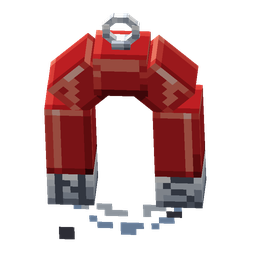 Magnet Charm
Underground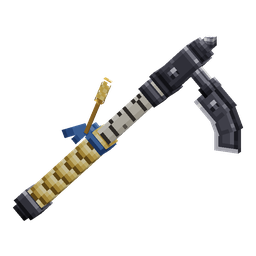 Harvester Hoe
Meadow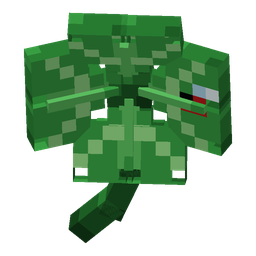 Lucky Clover
Meadow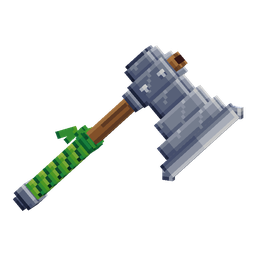 Lumber Axe
Forest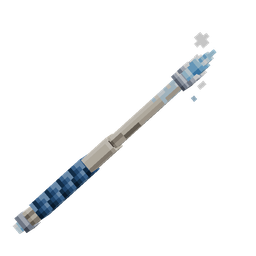 Frost Wand
Snow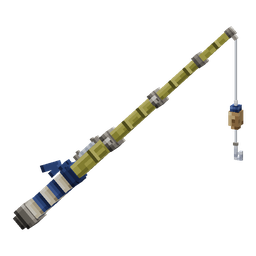 Cane Pole
Beach Diver's Set
Ocean
Armour sets
Wear every piece of a set for its set bonus: Haste from the Miner's Set, a chance of extra crops from the Farmer's Set, and Dolphin's Grace from the Diver's Set.
The Christmas Set
The limited Christmas Set only comes from the Christmas Crate: festive tools, weapons and armour, each with its own ability. Wear all four armour pieces for Christmas Spirit, which can even save you from a killing blow.
Accessories and the bag
Accessories work from your Accessory Bag, not your hand. Type /accessories (or /bag) to open it. Put accessories in its open sockets and their bonuses work while you're on the islands.
- Everyone gets 1 open socket. Shark rank opens 2, Orca 3, Kraken 4, and Leviathan and Whale all 5. Whale's accessories also work 10% better.
- Only accessories go in, one to a socket, and never two copies of the same one, even at different tiers.
- Different accessories stack: when two give the same kind of bonus they add up, on top of your armour and the tool in your hand.
- Upgrade an accessory at the Realm Forge to make its bonus stronger.
Pets
Pets hatch from Pet Eggs. Put up to five on your team: they follow you everywhere, level up as you play and give you their abilities. /pets opens your collection, where you can also breed them into better ones.
Island upgrades, levels and worth
Island upgrades
Island upgrades come with island levels. Each level you buy improves your island for everyone on it: a bigger border to build in, more spawner slots, stage chests more often, a chance of double drops from the OneBlock, faster crops and farm plants, more Shards and player XP from breaking it, and faster Blueprint builds.
Island levels
Every island starts at the first level. /is level shows every level, what each level gives and what the next level costs. Anyone on the island can pay for it with their own money to raise the island a level.
Some levels also open the next chapter of the OneBlock: the Nether, the End and the Realms each wait for an island level, and so do the Nether and End resource worlds.
Island worth
Your island's worth is what the valuable blocks on it add up to. Ores, ore blocks and rare blocks like beacons, conduits and spawners all count. Plain building blocks, dirt and stone count for nothing, and so does the OneBlock itself.
Worth changes as you place and break blocks, and it shows on your sidebar. The Island Top Worth board at spawn ranks every island.
Money
WhaleSMP has three currencies: money, Shards and Pearls. Everyone starts with none.
- Money is the main currency. Sell plain items with
/shop, or/sell handand/sell all. Crates give money notes: right-click a note to cash it in and the money goes straight to your balance. Notes of the same value stack. - Shards come from breaking the OneBlock now and then, levelling up, quests and more. Spend them at the Shard Shop (
/shardshop) on keys, Pet Eggs, refined materials and boosts like fly time. - Pearls are the store currency, and quests pay them too. Spend them in the in-game store,
/store, on ranks, keys, bundles and perks. - Check:
/balance(or/bal) shows all three. Add a name to see another online player's. - Send:
/pay <player> <amount>sends money to an online player. Add shards or pearls at the end to send those instead. Don't want payments?/paytoggleturns them off, and on again. To swap items,/trade <player>opens a trade window you both have to accept.
More ways to earn
- Free rewards: claim a free kit every day with
/kits, and a reward for every milestone of time you play with/playtime. - Whale Exchange: roll free sell contracts every day at the machine at spawn and sell one item at a boosted price while it runs.
/exchangechecks it from anywhere. - Item Upgrader: put items in, pick a reward worth more and spin. The bigger the reward, the smaller the chance. Open it with
/upgrader.
The Richest Players board at spawn ranks everyone by their money, next to the boards for island worth and player level.
Ranks and the store
Ranks from the store unlock handy commands, more homes, vault pages and Accessory Bag sockets, and a weekly kit. There are six, from Dolphin up to Whale, and each rank also gets everything the ranks below it have.
- Dolphin
/trash - Shark
/feed/back - Orca
/heal - Kraken
/repairfor the item in your hand - Leviathan
/repairfixes everything at once, and every Accessory Bag socket - WhaleEverything above, plus coloured chat, unlimited fly time on your island and stronger accessories
Some perks are sold on their own, whatever your rank: /fly, /craft, /anvil, /condense and /repair. Buy one once and it's yours for good.
Fly time is separate: redeem Fly Time Vouchers from the Shard Shop, crates or voting, then /flytime flies you around your own island while it lasts.
The store has ranks, rank upgrades, crate keys, bundles, Lucky Boxes and perks. Open it in game with /store, or talk to Sunny at spawn: pay with Pearls and get it straight away, or choose Buy from Store to check out on the webstore with a QR code or a link. Whenever someone buys from the webstore, a GG wave starts: say gg in chat for a free Pearl.